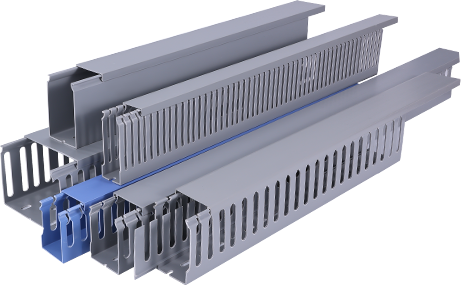
If you have ever struggled with loose cables cluttering your workspace, home office, or entertainment area, a PVC cable raceway is one of the most affordable, durable, and beginner-friendly solutions to hide and organize wires safely. Unlike hardwired conduit installations that require professional electrical knowledge, PVC cable raceways are designed for DIY installation, requiring only basic tools and minimal planning to get a clean, professional-looking result. This PVC Cable Raceway tutorial will walk you through every step of the process, from preparing your workspace to finishing the installation, so you can achieve a tidy, hazard-free space without hiring a contractor. Whether you are organizing ethernet cables for your home network, hiding TV wires behind a wall mount, or sorting power cords in a workshop, this guide will give you all the information you need to complete the project successfully.
First, you need to gather all the necessary tools and materials before starting your installation, which will save you time and prevent interruptions mid-project. For materials, you will need PVC cable raceway kits, which typically include pre-cut channel sections, snap-on covers, mounting adhesive, end caps, and corner connectors to fit turns and edges. If you need custom lengths, you can purchase full 10-foot PVC raceway strips and cut them to size yourself. You will also need a measuring tape, pencil, level, fine-tooth saw or utility knife for cutting PVC, a damp cloth for cleaning surfaces, and optionally, a drill and screws for extra secure mounting on uneven or textured walls. It is important to choose the right size raceway for your project: a ½-inch by ½-inch raceway works for 2-3 thin cables, while a 1-inch by 1-inch raceway can hold up to 8-10 low-voltage cables, so count your wires before purchasing to avoid buying a size that is too small.
Next, you need to prepare the installation surface and map out your cable route to ensure a smooth, neat result. Start by cleaning the wall or baseboard surface where you will install the raceway with a damp cloth, removing all dust, grease, and debris, because any dirt will prevent the adhesive from sticking properly. Let the surface dry completely before moving forward. Then, use your measuring tape and pencil to mark the route of the raceway, starting from the power source or device and ending where the cables need to connect. Use a level to make sure your marks are straight, unless you are running the raceway along a baseboard or ceiling edge, where you can follow the existing straight line. Remember to account for any corners, door frames, or obstacles, and mark where you will need to cut the raceway or add corner connectors. At this step, you should also gather all the cables you plan to hide, untangle them, and lay them along the marked route to confirm everything fits before you mount the raceway permanently.
Once your route is mapped out, you can cut the PVC raceway to your required lengths and mount the base channel to the surface. If you are using pre-cut sections, you can skip this step, but for custom routes, measure the marked length carefully, mark the cut line on the PVC base with a pencil, and clamp it to a workbench to keep it steady while cutting. A fine-tooth hacksaw will give you the cleanest cut, and you can sand the edges lightly with fine-grit sandpaper to remove any burrs that could damage cable insulation. After cutting all sections, peel the backing off the adhesive strip on the back of the PVC base, align it carefully with your pencil marks, and press firmly along the entire length to secure it to the wall. If you are installing on a textured wall or the adhesive does not feel secure enough, you can drill small pilot holes through the mounting tabs on the base and screw it to the wall for extra stability. Connect multiple sections by butting the ends together tightly, and use corner connectors for inside or outside turns to keep the installation looking seamless.
After the base channel is fully mounted, you can add your cables and finish the installation by attaching the cover and end caps. Start by feeding all your cables through the base channel one by one, making sure they lay flat and do not overlap too much, which can make it hard to snap the cover on. Leave a little extra slack at each end to make connecting devices easier, and avoid pulling the cables too tight, which can put stress on connectors over time. Once all cables are in place, align the snap-on cover with the edges of the base channel, and press firmly along the length until you hear it click into place. Trim any excess cover if needed, and attach end caps to both open ends of the raceway to give it a finished, clean look. Finally, plug in your devices and test all connections to make sure nothing was damaged during installation, and use a small amount of caulk to fill any gaps around end caps if you want an extra polished look.
To keep your installation looking great for years, there are a few simple maintenance tips you should follow. Check the raceway every few months to make sure the adhesive is still holding and the cover is secure, especially if you live in a area with extreme temperature changes, which can cause PVC to expand and contract slightly. If you need to add or remove cables later, you can simply pry off the cover with a flathead screwdriver, make your changes, and snap the cover back on easily, which is one of the biggest advantages of PVC cable raceways over permanent concealed wiring. Avoid running high-voltage main power cables through thin-wall PVC raceways unless the product is rated for it, always check the manufacturer’s specifications to ensure your installation meets safety standards. By following this step-by-step tutorial, even a complete beginner can complete a professional cable organization project in just a few hours, resulting in a clutter-free space that is safer and more visually appealing.