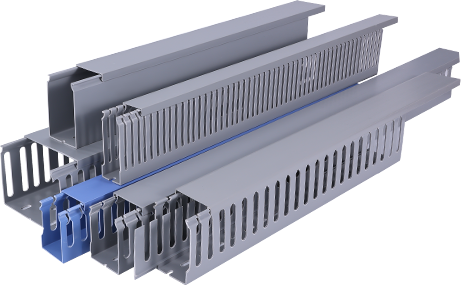
If you’ve ever struggled with tangled cables running across your floor, along baseboards, or behind your desk, a PVC cable raceway is an affordable, accessible solution that keeps your space organized and safe. Unlike expensive in-wall wiring upgrades or messy cable ties that leave wires exposed, PVC cable raceway offers a clean, durable way to hide unsightly cords while keeping them accessible for future adjustments. This tutorial will walk you through every step of planning, prepping, and installing a PVC cable raceway, even if you have no prior experience with home improvement projects. Whether you’re tidying up a home office, entertainment center, or commercial workspace, this guide will help you achieve a professional-looking result in just a few hours.
First, you need to gather all the necessary tools and materials before you start the installation, which will save you time and prevent mid-project interruptions. The core material, of course, is your PVC cable raceway kit, which you can find at any local hardware store or online retailer. Most pre-cut kits include straight sections, corner connectors, end caps, and mounting tape, but you may need to purchase extra sections if you’re covering a longer run. Beyond the raceway itself, you’ll need a few basic tools: a tape measure to map your run, a pencil to mark cutting lines, a fine-tooth hacksaw or PVC cutter to trim sections to size, a level to ensure your raceway is straight, and a cleaning cloth with rubbing alcohol to prep the mounting surface. If you’re mounting on textured walls or brick, you may also need screws and a drill instead of the included adhesive tape for a more secure hold. Once you have all your supplies ready, take a few minutes to map out the path of your raceway. Choose a route that follows existing architectural features like baseboards, door frames, or crown molding to make the raceway less noticeable, and avoid running it near water pipes or electrical lines that could pose a safety risk.
Next, prepare your surface and cut your PVC raceway sections to fit your planned path. Start by cleaning the wall or baseboard surface where you’ll install the raceway with rubbing alcohol; this removes dust, grease, and residue that can prevent the adhesive from sticking properly. Let the surface dry completely before moving on. Then, measure each section of your path one at a time, and mark the PVC raceway with a pencil to indicate where you need to cut. It’s always better to measure twice and cut once to avoid wasting material. If you’re using a hacksaw, secure the raceway in a vise or with a clamp to keep it steady while cutting, and sand the cut edge lightly with fine-grit sandpaper to remove any burrs that could make it hard to fit connectors or damage your cables. Once all your sections are cut, dry fit them together along your marked path to make sure everything fits correctly before you peel off the adhesive backing. This step helps you catch any sizing mistakes early, when they’re easy to fix instead of after you’ve already mounted the raceway to the wall.
After dry fitting all your pieces, it’s time to mount the raceway base and add your cables. Start at one end of your run, peel the backing off the adhesive tape on the back of the first base section, and press it firmly against the clean wall surface. Use your level to check that it’s straight as you go, and hold it in place for 30 to 60 seconds to ensure the adhesive bonds properly. Work your way along the path, connecting each section with the appropriate connectors—use 90-degree inside or outside connectors for corners, and T-connectors if you need to split your cable run in multiple directions. Once the entire base is mounted, you can lay all your cables inside the raceway. One of the biggest advantages of PVC cable raceway is that it lets you group multiple cables together, from power cords and HDMI cables to Ethernet and speaker wires, so you can organize all your connections in one neat channel. Leave a little extra slack at each end of the run to make it easier to connect your devices and adjust cables later if you need to move equipment.
Finally, secure the cover onto the raceway base and finish up any small details to complete your installation. Most PVC cable raceway systems have a snap-on cover that simply clicks into place on the base, so you don’t need any extra tools to attach it. Start at one end and work your way down the run, pressing the cover firmly until you hear it click into place every few inches to make sure it’s secure. Add end caps to both ends of the run to give it a clean, finished look, and wipe down the raceway with a dry cloth to remove any fingerprints or dust. Once you’re done, step back and check your work: the raceway should be straight, all connectors fit snugly, and no cables are peeking out from the edges. If you notice any loose sections, just press them firmly back into place, or add a small dab of construction adhesive behind the base for extra hold if you’re mounting on a textured surface.
Installing a PVC cable raceway is a quick, low-cost project that makes a huge difference in the look and safety of any space. Not only does it eliminate tripping hazards from loose cables running across the floor, but it also protects your cables from damage caused by foot traffic, furniture, or pets. Unlike permanent in-wall wiring, PVC cable raceway is completely non-damaging to your walls, and you can easily remove it or reconfigure the run if you move your furniture or change your setup later. By following this simple tutorial, even a beginner can achieve a clean, professional result in less than a day, turning a cluttered space into an organized, functional area that looks neat and put-together.