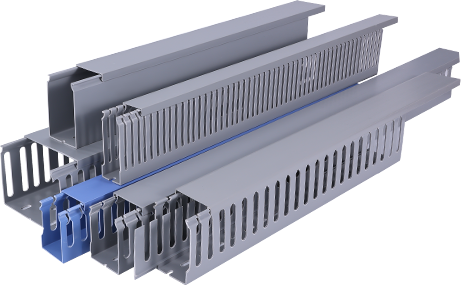
Cable management is a critical component of any electrical installation, home renovation, or commercial fit-out, and simple PVC cable trunking has emerged as one of the most accessible and cost-effective solutions for organizing exposed wiring. Unlike more complex metal or composite trunking systems, PVC options offer lightweight construction, corrosion resistance, and low upfront costs, making them ideal for DIY enthusiasts and professional electricians alike. However, even with a straightforward material, strategic planning and execution are essential to achieve a clean, safe, and long-lasting result that meets both functional and aesthetic requirements. These simple PVC cable trunking strategies help streamline installation, improve safety, and extend the lifespan of your cable management system, regardless of the project size.
First, start with accurate pre-installation planning to avoid common mistakes that can compromise the final result. Before purchasing any materials, take detailed measurements of the route your cables will follow, and count the total number and diameter of cables that will fit inside the trunking. A common error is choosing a trunking size that is too small for the current cable load, which leaves no room for future expansions and can cause overheating from trapped cables. For simple residential projects like running HDMI, power, or network cables along a wall, a 10mm x 20mm or 15mm x 30mm trunking is usually sufficient, but always add 20 to 30 percent extra internal space to accommodate future additions. Additionally, map out any obstacles such as door frames, electrical outlets, or skirting boards ahead of time, and plan for the required corner connectors, end caps, and joint pieces to avoid mid-project interruptions. This pre-planning step takes only a fraction of the total installation time, but it saves hours of rework and extra material costs down the line.
Secondly, choose the right simple PVC trunking profile for your specific use case to maximize functionality and aesthetics. Simple PVC cable trunking comes in two main profiles: self-adhesive flat trunking for surface mounting on walls and ceilings, and square or rectangular trunking for higher cable volumes. Self-adhesive options are perfect for quick, non-damaging installations in rented properties or temporary setups, as they require no drilling and can be removed without leaving significant marks on painted surfaces. For permanent installations in commercial spaces or new home builds, screw-fixed trunking offers greater stability, especially when holding heavier bundles of power cables. Another strategic choice is to select a trunking color that matches your wall or skirting board; white or light gray trunking blends seamlessly with most painted interior walls, while dark options work well with wooden paneling or industrial-style spaces. Matching the trunking to your background makes the system far less noticeable, creating a cleaner, more polished finished look.
Additionally, follow proper installation techniques to ensure a secure, neat, and safe finished system. For self-adhesive simple PVC trunking, always clean the mounting surface with rubbing alcohol to remove dust, grease, or flaking paint before peeling off the adhesive backing. This ensures the adhesive forms a strong bond that prevents the trunking from peeling off over time, especially in areas with temperature fluctuations that can weaken adhesive grip. When cutting PVC trunking to size, use a fine-tooth hacksaw or a PVC cutting tool to get a clean, straight cut; rough edges can make it difficult to fit connectors properly and can even damage cable insulation over time. When joining multiple lengths of trunking, leave a 1mm expansion gap between cut ends to account for thermal expansion in areas exposed to direct sunlight or temperature changes, which prevents the trunking from warping or buckling. For safety, always leave power cables and data cables in separate compartments if you are running both in the same trunking route, as this prevents electromagnetic interference that can disrupt internet or audio-visual signals.
Furthermore, implement simple long-term maintenance strategies to keep your PVC cable trunking system functioning properly for decades. PVC is a low-maintenance material, but occasional cleaning and inspection can prevent small issues from becoming major hazards. Every 12 to 18 months, check the mounting points to ensure adhesive bonds or screws are still secure, especially if the trunking is located in high-traffic areas or near heat sources like radiators. Wipe the surface of the trunking with a mild detergent and soft cloth to remove dust and grime, which keeps it looking neat and prevents discoloration from prolonged exposure to sunlight. If you need to add new cables to the system, simply remove the cover, insert the new cables, and replace the cover—one of the major advantages of simple PVC trunking is its accessibility for future modifications, so avoid sealing the trunking shut with adhesive or caulk unless absolutely necessary.
In conclusion, simple PVC cable trunking is an incredibly accessible and effective cable management solution, but following strategic planning, selection, installation, and maintenance practices ensures you get the best possible result from your project. These strategies do not require specialized training or expensive tools, making them accessible to DIYers and valuable for professional electricians looking to streamline their work. By investing time in pre-installation planning, selecting the right profile for your space, following proper installation techniques, and completing occasional basic maintenance, you can achieve a safe, neat, and long-lasting cable management system that meets your current needs and leaves room for future upgrades. Whether you are tidying up loose cables behind a home entertainment system or organizing wiring for a small commercial space, these simple PVC cable trunking strategies deliver professional-quality results without the high cost or complexity of alternative systems.