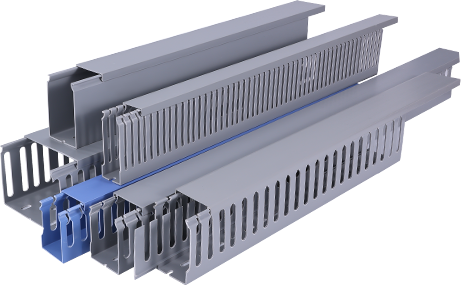
If you have ever dealt with tangled cables across your floor, messy wiring behind your desk, or exposed electrical cords running along your wall, you know how much of a safety hazard and eyesore they can be. PVC cable raceway is an affordable, accessible solution that organizes your wiring, protects cables from damage, and keeps your space neat and safe. Unlike metal raceways, PVC is lightweight, easy to cut, non-conductive, and resistant to moisture and corrosion, making it ideal for both residential and light commercial wiring projects. Whether you are a beginner DIY enthusiast or a professional electrician looking for a refresher, this guide will walk you through every step of installing PVC cable raceway correctly. First, you need to gather all the necessary tools and materials before starting your project. The core component is, of course, the PVC cable raceway kit, which typically includes pre-cut channel sections, matching cover pieces, end caps, corner connectors, and mounting hardware. If you cannot find a pre-sized kit for your space, you can buy bulk PVC raceway by the foot and cut it to your required length. Additional tools you will need include a tape measure, pencil, level, utility knife or fine-tooth hacksaw, sandpaper, a stud finder (for wall-mounted installations), a drill with the appropriate bit, screwdriver, and adhesive caulk or double-sided mounting tape for non-drilling applications. It is also important to wear safety glasses and work gloves to protect yourself from sharp PVC edges and flying debris during cutting. Once you have all your supplies ready, the next step is to plan your raceway route. You need to map out where your cables will run, taking into account the location of power outlets, electronic devices, and structural obstacles like baseboards or wall studs. For the most discreet look, try to run the raceway along baseboards, ceiling edges, or inside corner joints where it will blend in with your existing decor. Use your stud finder to mark any wall studs along the route, as mounting to studs will provide the most secure hold for heavier bundles of cable. Use your pencil to draw a straight guide line along your planned route, and use the level to make sure your line is perfectly straight—this will ensure your finished installation looks clean and professional. After planning your route, you can start measuring and cutting the PVC raceway sections. Measure the length of each segment of your route, and add about a quarter of an inch of extra length to account for any cutting errors or connector adjustments. When cutting PVC, a fine-tooth hacksaw will give you the cleanest cut, but a sharp utility knife can also work for thinner, smaller raceways. Make sure to cut straight across the raceway to avoid uneven edges that will make it hard to fit the cover or connectors. Once you have cut each section, use fine-grit sandpaper to smooth down any rough edges or burrs left from cutting—this will prevent the sharp edges from damaging your cable insulation, and make it easier to snap the cover into place. Next, it is time to mount the base channel of the PVC cable raceway to your surface. If you are mounting to drywall or wood studs, align the base channel with your pencil guide line, mark the mounting hole locations with your pencil, then pre-drill pilot holes to prevent the PVC from cracking when you drive in the screws. Secure the base channel to the wall or surface with the provided screws, making sure it is tight and does not wiggle. If you do not want to drill into your wall (for example, if you are renting or working on a temporary installation), you can use strong double-sided mounting tape or construction adhesive instead. Just make sure to clean the wall surface with rubbing alcohol first to remove any dust or grease, which will help the adhesive stick better. When joining multiple raceway sections or turning corners, use the matching PVC connectors to create a smooth, seamless transition, and secure each connector the same way you secured the main channel. Once your base channels and connectors are all mounted, you can move on to placing your cables inside the raceway. Gather all the cables you plan to route, untangle them completely, and make sure there are no knots or kinks that will take up extra space. Lay the cables loosely inside the base channel—do not overstuff the raceway, as overcrowding can trap heat, which is a fire hazard for electrical cables, and it will also make it hard to close the cover. Leave a little bit of extra slack at each end of the raceway near outlets or devices, so you can adjust the cables later if you need to move devices or add new wiring. After all your cables are in place, you can simply snap the PVC cover onto the base channel. Most PVC raceway covers are designed to click into place easily, but you can apply a little bit of pressure along the entire length to make sure it is fully secured. Finally, add any end caps to the open ends of the raceway to give your installation a finished, polished look and prevent dust from accumulating inside. After installation, take a minute to double-check your work: make sure the raceway is firmly attached, the cover is fully closed, all cables are hidden, and there are no loose pieces that could fall off over time. Installing PVC cable raceway is a straightforward DIY project that takes just a few hours to complete, even for beginners, and it delivers long-term benefits by improving safety, reducing clutter, and protecting your wiring from damage. By following these simple steps, you can turn a messy tangle of cables into a clean, organized installation that looks great and lasts for years. Remember to always check local electrical codes before starting any wiring project, and if you are working with high-voltage electrical wiring, consult a licensed electrician to ensure your installation meets safety requirements.